


Curate Your YouTube Feed
Tired of seeing videos in languages you don’t speak in your YouTube feed? 😤 While there's no single "off" switch, you can retrain the algorithms! I’ve curated 6 simple yet effective steps—from Google settings to handy mobile apps—to help clean up your recommendations. 🧹 Digital hygiene starts with small steps. Check out the post to find out how! 👇
3/14/20262 min read
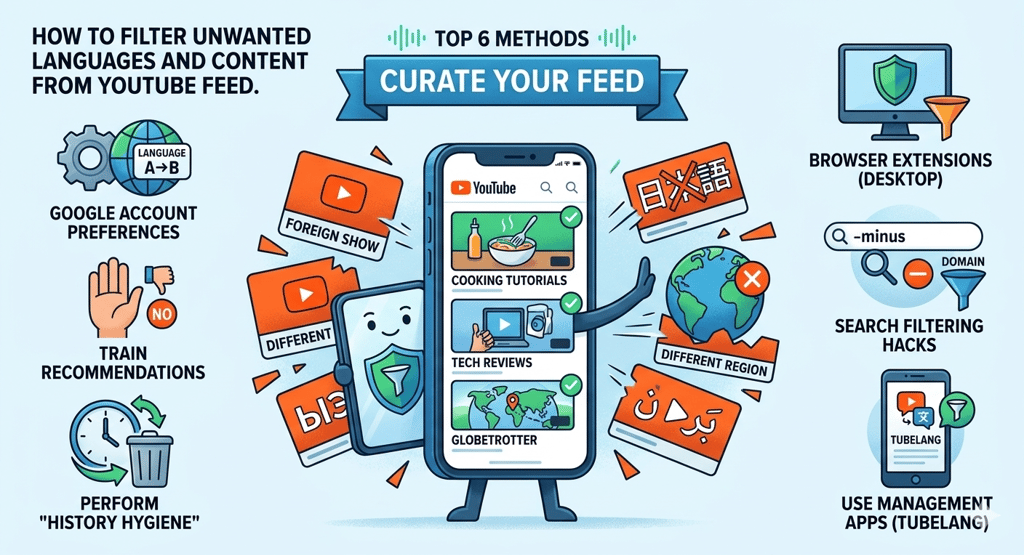

If your YouTube recommendations are filled with content in a language you don't speak or from regions you aren't interested in, there is no single "off" switch. However, you can effectively "retrain" the algorithm by following these six steps:
1. Update Your Google Account Language Preferences
YouTube uses your general Google profile to determine which languages you understand.
Go to your Google Account Settings.
Under "Personal info" → "General preferences for the web" → "Language", remove any languages you do not want to see.
Pro Tip: Disable the "Automatically add languages" feature. This prevents Google from re-adding a language if it detects you interacting with that content.
2. "Train" the Recommendation Algorithm
The algorithm is based on engagement. If you see a video in an unwanted language:
Do not click it (even to leave a dislike—interaction is still engagement).
Click the three dots ⋮ next to the video title.
Select "Not interested" or "Don't recommend channel." This is the most direct way to tell YouTube what you want to avoid.
3. Perform "History Hygiene"
YouTube suggests content based on what you have watched in the past.
Navigate to your YouTube History.
Search for and delete old videos or search queries in the unwanted language. This "resets" the data points that trigger those specific recommendations.
4. Use Browser Extensions (Desktop)
For computer users, various browser extensions allow you to filter content by keywords or specific characters.
Look for tools like "Channel Blocker" or "Video Blocker" that allow you to blacklist specific words, tags, or entire channels from appearing in your search results and sidebar.
5. Search Filtering Hacks
When searching for a topic, you can manually exclude results from specific regions or in specific languages using search operators.
Use the minus sign - followed by a keyword or domain extension. For example: cooking tutorials -.es (to exclude Spanish-language domains) or tech reviews -keyword (to exclude specific topics).
6. Use Dedicated Management Apps (TubeLang)
Specialized tools like TubeLang are designed to help you manage your account's "language footprint" directly from your smartphone.
What it does: It allows you to analyze your subscriptions and "Likes" by language. You can mass-unsubscribe from channels or bulk-remove likes from videos in a specific language, which is the fastest way to signal a change in preference to the algorithm.
Download: Available on the App Store and Google Play.
Summary: For the best results, use a management app to clear your past "Like" history and then strictly use the "Don't recommend channel" button for any new unwanted videos that appear.